

Description
Overview
HD Video Downloader APK is a dedicated Android application designed for users seeking a straightforward way to download videos from various online platforms. The software enables users to save content from websites such as YouTube, Facebook, Instagram, and TikTok directly to their mobile device’s storage. Its primary purpose is to allow offline access to favorite videos, making it ideal for individuals who frequently watch video content while traveling or in areas with limited internet connectivity.
Target users include casual viewers, social media enthusiasts, and mobile users who value convenience and simplicity. The app is particularly suited for those who want to preserve video content for later viewing without relying on streaming services. The developer, New Essence, has positioned the tool as a lightweight and user-friendly solution, emphasizing ease of use over advanced customization options.
Real-world usage scenarios include downloading educational videos, entertainment clips, or personal content shared on social media for offline playback. The application is presented as a free-to-use tool, allowing access to video downloads without subscription fees or in-app purchases. However, the developer did not provide additional system requirements, and no performance benchmarks were specified.
Key Features & Capabilities
- Multi-Platform Video Download Support – HD Video Downloader APK allows users to extract and save videos from major websites including YouTube, Facebook, Instagram, and TikTok. This broad compatibility enables users to preserve content from diverse sources without switching between multiple apps.
- Simple One-Tap Download Process – The application is designed around a minimalistic interface that requires only a few taps to initiate a download. Users can copy a video URL, paste it into the app, and begin saving the file to their device’s internal storage or SD card.
- Offline Video Access – Once downloaded, videos are stored locally, enabling uninterrupted playback without an active internet connection. This feature is especially useful for long commutes, flights, or areas with unstable network coverage.
- Lightweight Design – The app is optimized to consume minimal memory and processing power, ensuring it runs smoothly on a wide range of Android devices without causing system slowdowns.
- Universal Compatibility with Video Formats – The tool supports a variety of common video formats, allowing users to access their downloaded content across different media players on their device.
These features collectively streamline the video download process, making it accessible even to users with limited technical experience. The app eliminates the need for complex configurations or third-party tools, positioning itself as a go-to utility for on-the-go content consumption.
User Interface, Workflow & Performance
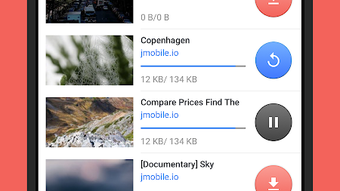
The user interface of HD Video Downloader APK is described as simple and well-designed, focusing on ease of navigation and quick access to core functions. The layout is intuitive, with a central input field for pasting video URLs and a prominent download button. Secondary options such as download quality selection and storage location are likely accessible through a streamlined menu, though specific UI details were not provided.
Workflow efficiency is a key strength, as the entire process—from copying a URL to saving the file—can be completed in under 30 seconds. This rapid turnaround enhances user satisfaction, particularly for those who need to download multiple videos in succession. The app is marketed as being reliable and stable during operation, though exact performance data or resource usage metrics were not disclosed.
General performance observations are based on typical behavior of lightweight Android utilities. The developer did not specify CPU or RAM consumption, nor did they provide information on background operation or battery impact. However, the app’s lightweight nature suggests it is unlikely to cause significant system strain. Stability during extended use remains unverified due to the absence of user reports or testing data.
Compatibility & System Requirements
HD Video Downloader APK is designed for Android operating systems, though the exact version range is not specified by the developer. The application is distributed as an APK file, meaning it can be installed on Android devices without requiring official app store distribution. This method of delivery provides flexibility but may pose security risks if the source is unverified.
The installation size is not provided, but the app is described as lightweight, indicating a small footprint on device storage. Hardware requirements were not listed, and the developer did not specify minimum processor speed, RAM, or screen resolution. As such, compatibility with older or low-end devices cannot be confirmed based on available information.
Users are advised to ensure their device allows installations from unknown sources to use the APK. The absence of detailed system requirements means potential installation issues may arise on certain devices, particularly those with strict security policies or outdated OS versions.
Pros and Cons
Pros
- Simple, intuitive interface suitable for non-technical users
- Supports video downloads from major platforms like YouTube, Facebook, and TikTok
- Enables offline viewing without internet dependency
- Lightweight design with minimal system resource usage
- Free to download and use without subscription fees
Cons
- No official system requirements provided by the developer
- APK distribution method may raise security concerns
- Exact performance and battery impact details not disclosed
- Limited information on supported video formats and quality options
- No official updates or developer support channels mentioned
FAQ Section
Is HD Video Downloader APK compatible with all Android devices?
Compatibility depends on the Android version and device specifications. While the app is designed to be lightweight, the developer did not specify exact compatibility details. Users should ensure their device allows installations from unknown sources.
Is it safe to download HD Video Downloader APK from third-party sites?
Downloading APK files from untrusted sources may pose security risks. It is recommended to obtain the file only from reputable websites and to scan it with a trusted antivirus tool before installation.
Does the app require an internet connection to download videos?
Yes, an active internet connection is required to download videos. However, once saved, videos can be viewed offline without any network access.
Can I use HD Video Downloader APK without creating an account?
Yes, the app does not require registration or login. All features are accessible immediately after installation.
Are there any updates or version improvements available?
Information about updates is not publicly available. The developer has not disclosed a formal update schedule or support channel.
Final Thoughts + CTA
HD Video Downloader APK presents a compelling option for Android users who want to download and save videos from popular platforms with minimal effort. Its straightforward interface, broad website compatibility, and offline functionality make it a practical tool for mobile content consumption. While the lack of detailed system requirements and transparency around updates may raise concerns for some users, the app’s lightweight design and free access offer significant value.
It is best suited for casual viewers, students, and travelers who prioritize convenience and ease of use over advanced features. For those seeking a no-frills solution to save videos for offline viewing, this APK-based tool delivers on its core promise. However, users should exercise caution when installing APKs from unofficial sources.
Download HD Video Downloader APK now and start saving your favorite videos for offline enjoyment.
Guides & Tutorials for HD Video Downloader APK
How to install HD Video Downloader APK
- Click the Preview / Download button above.
- Once redirected, accept the terms and click Install.
- Wait for the HD Video Downloader APK download to finish on your device.
How to use HD Video Downloader APK
This software is primarily used for its core features described above. Open the app after installation to explore its capabilities.
User Reviews for HD Video Downloader APK 0
No reviews found





